Remote Learning
Remote education provision
Information for Parents/Carers
This information aims to give clarity and transparency to students and parents/carers about what to expect from remote education if circumstances require students to learn from home.
Teachers upload resources to each class Microsoft Teams area so that students can access materials from day one. By the second day of remote education, teachers will ensure that each class has access to meaningful work through Synergy and/or Microsoft Teams.
We are committed to offering a broad and rich curriculum whether students are learning on site or remotely. Students will follow the same curriculum as they would in school.
In practical subjects where specialist equipment may be required, students (particularly in KS3) may complete extended project work or research-based tasks. In some KS4/KS5 subjects, staff may temporarily shift to theory-based content where this is more suitable for home learning.
Remote Teaching and Study Time Each Day
Remote education, including teacher-led content and independent work, should take students approximately the same amount of time as a typical school day at around 5 hours of learning.
Accessing Remote Education
All work set will be placed on Synergy (through the Homework icon) and/or the relevant subject Microsoft Teams channel. Students can download Microsoft Office for free and guidance on using Teams can be found further down this page, under the section 'Accessing Teams & outlook for email guide'.
We recognise that some students may not have adequate access to a device or the internet. We support families in the following ways:
- Through parental surveys, we have identified students in need of a school laptop loan and have distributed devices accordingly.
- If you believe your child needs a laptop or technical support, please contact: ictsupport@qphs.co.uk
- For short-term issues with internet or device access, teachers can arrange for paper-based work to be provided until the problem is resolved.
How will my child be taught remotely?
We use a range of approaches to deliver remote education. While live lessons do not remain part of our provision, our focus is on using technology to enhance and support learning, rather than replicating the classroom exactly.
Methods include:
- Digital resources and tasks uploaded to Teams or Synergy
- Online quizzes and learning platforms to support retrieval, practice and assessment
- Independent work supported by digital resources, instructions, or pre-recorded guidance
Technology is used to supplement learning, ensuring continuity, supporting revision, and giving students tools to manage and revisit their learning effectively.
Engagement and Feedback
We encourage students to follow their normal school timetable where possible.
Parents/carers are not expected to teach students directly. The work set is designed to be completed independently with reasonable effort. We simply ask that students log in and begin learning by 8.40am each day.
Teachers monitor engagement through submitted work. If concerns arise, we will contact you, usually through the pastoral team, to offer support. Subject teachers may also get in touch where engagement in a specific subject is a concern.
Feedback may take a variety of forms:
- Automatically marked quizzes
- Marking of uploaded work in line with school policy
We regularly use low-stakes tests (LSTs) to support recall and assess understanding. These may be delivered through Forms, online quiz platforms, or within digital lesson materials.
Extended Online Learning Provision
Where students may require a longer period of learning from home, external online providers, such as Academy 21, may be used to support with teaching and learning. When a student is placed on such provision, the following expectations apply:
- Students should treat their online lessons with the same level of commitment, professionalism and respect as they would in a conventional classroom. This includes attending scheduled live lessons punctually, actively participating, completing homework and using the online platform responsibly.
- Parents/carers should support their child by ensuring the student has a suitable learning environment, appropriate access to technology (see above about access to technology) and encourage good routines and engagement. This support is particularly important if students are learning from home.
- The school will treat online provision not as a temporary fix but as an integral part of the student’s full-time education. The placement will be reviewed regularly to ensure that the chosen provision continues to meet the student’s academic, social, emotional, and wellbeing needs.
To maintain high standards of provision and safeguard students’ progress, the following procedures will apply when a student is enroled with an approved online provider like Academy21:
- The school’s attendance team will monitor attendance and engagement each day using the provider’s portal, which logs when a student enters the virtual classroom, tracks punctuality (presence, lateness) and records final attendance at intervals after the lesson starts.
- At agreed intervals, the school will formally review the suitability and effectiveness of the online provision for the student, considering academic progress, engagement, wellbeing, and social integration.
Free Office 365 Package for all students
Queen's Park High School students are now able to download a full version of Microsoft Office for PC or Mac free of charge for installation on personal devices including tablets and phones.
For tablets and phones, all you need to do is download Word/Excel/Powerpoint to your device from the App Store/Google Play and sign in using your school email address.
Please note: Kindle Fire Devices aren't currently supported with Office 365 Apps
To install for PC or Mac, please see the Installation Guide in the download section at the bottom of this page.
Student Email Addresses
Password Resets
To get a school password reset, please email our IT department: ICTSupport@qphs.co.uk
Accounts password resets include Synergy, Office 365 (email, teams), EduCake and GCSEpod. Other IT issues can also be sent to the ICTSupport email address.
Online Learning - Microsoft Teams
To support students with their studies during remote learning, resources have been uploaded onto Teams to enable students to continue their learning in their subjects.
Microsoft Teams can be accessed via any type of smart phone (should a laptop/tablet not be available). The app is free to download and login information is the same as accessing via a computer or tablet.
For those students who are struggling to access Microsoft Teams, Julia and Hannah from our former Sixth Form Leadership Team have put together a short video to explain how it works when using a smart phone or computer.
Accessing Teams & outlook for email guide
On a PC/laptop
> Open an internet browser and open the following web address: www.office.com
> From the sign in page - enter your school email address
(this is your normal username which is used to log into the school network with @qphs.co.uk at the end. For example, someone who normally logs on with 19FredB would use 19FredB@qphs.co.uk)
> You will then be prompted for a password - enter your normal school login password
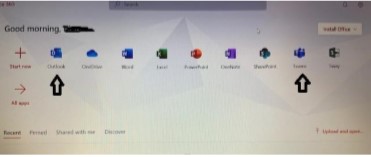
> You will then get the screen which is shown in the image below
> Choose Teams to access Microsoft Teams and Outlook to send and receive emails
> If you are prompted to re-enter login details, this is the same as above
Please remember that you can also use this account to download Microsoft Office programmes (such as Word, Powerpoint) to your PC, tablet or phone.
Helpful resources during home learning
| Learning Resources from BBC Bitesize | website |
| BBC Bitesize education package | website |
| BBC Bitesize KS3 subject support | website |
| GCSEPod KS4 subject support | website |
| Oak National Academy (new online classroom & resource hub) | website |
| Internet Safety - keep children safe online | website |
| Online safety parent guide | download |
| Online safety student guide | download |
| Tips to help parents cope whilst school is closed | website |
| NHS Mental Health Helpline (open 24 hours a day, 7 days a week) | website |
| Supporting young people's mental health during periods of disruption | website |
| Young Minds (UK's leading charity fighting for children and young people's mental health) | website |
| NHS Every Mind Matters | website |
| NHS Urgent Support | website |
| Stop It Now! (Anonymous & confidential support to help prevent child sexual abuse) | website |